Bhakti Homes
  • Bhakti Homes
  • Home´s Manual
    • How to Practice
      • Sadhana
      • Kirtan
      • Deity Worship
      • Family Life
      • Youth
      • Children and Parenting
    • How to Share
      • Indirect Ways
        • Yoga & Meditation
        • Cooking Classes
        • Mantra Power
        • Ceremonies
      • Direct Ways
        • Sharing Krishna at Home
          • Sanga at Home
          • Sastra Groups
          • 3 hs Kirtan
          • Bhakti Vriksha
          • Guideline Videos for «home programs»
        • Going Out to Share
  • en Español
  • Social Network
  • Preguntas Frecuentes
  • Contact
Select Page

GURU VANDANA (SANSKRIT LYRICS)

(1)

śrī-guru-caraṇa-padma, kevala-bhakati-sadma,

bando muñi sāvadhāna mate

jāhāra prasāde bhāi, e bhava toriyā jāi,

kṛṣṇa-prāpti hoy jāhā ha’te

(2)

guru-mukha-padma-vākya, cittete koribo aikya,

ār nā koriho mane āśā

śrī-guru-caraṇe rati, ei se uttama-gati,

je prasāde pūre sarva āśā

(3)

cakṣu-dān dilo jei, janme janme prabhu sei,

divya jñān hṛde prokāśito

prema-bhakti jāhā hoite, avidyā vināśa jāte,

vede gāy jāhāra carito

(4)

śrī-guru karuṇā-sindhu, adhama janāra bandhu,

lokanāth (or prabhupa) lokera jīvana

hā hā prabhu koro doyā, deho more pada-chāyā,

ebe jaśa ghuṣuk tribhuvana

(Prabhupada patita pavana!)

468
How to Translate this website to your language?

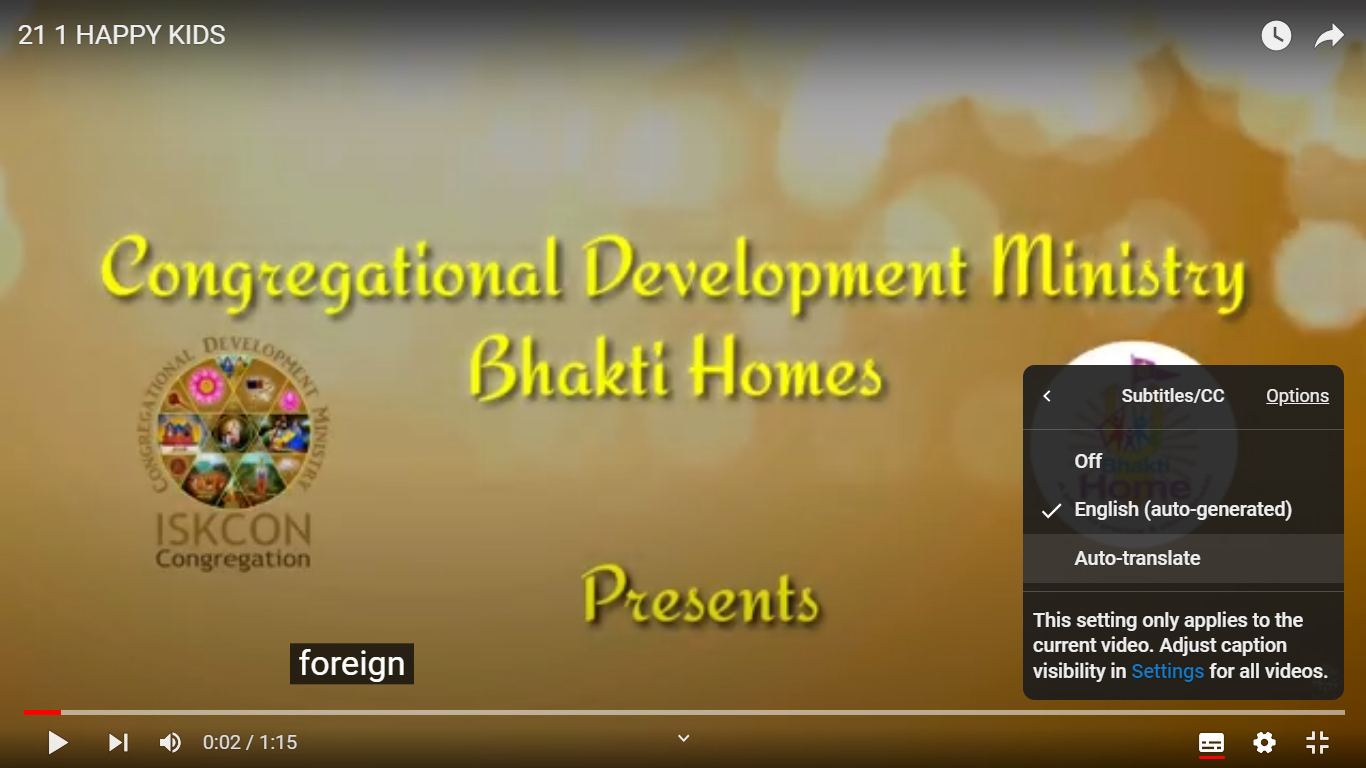
how to translate Youtube videos ON COMPUTER

Step 1

Press the “Settings Wheel” at the bottom right on the video.

Step 2

Select the “Captions (CC)” (or “Subtitles”) option

Step 3

If the option is available, choose “Auto- Translate” and go to Step 7. If not, select “English (Auto Generated)” and keep reading

Step 4

Press the “Settings Wheel” again at the bottom right of the video.

Step 5

Select the “Captions CC” option again

Step 6

Choose “Auto-Translate“

Step 7

Choose Your Language