Bhakti Homes
  • Bhakti Homes
  • Home´s Manual
    • How to Practice
      • Sadhana
      • Kirtan
      • Deity Worship
      • Family Life
      • Youth
      • Children and Parenting
    • How to Share
      • Indirect Ways
        • Yoga & Meditation
        • Cooking Classes
        • Mantra Power
        • Ceremonies
      • Direct Ways
        • Sharing Krishna at Home
          • Sanga at Home
          • Sastra Groups
          • 3 hs Kirtan
          • Bhakti Vriksha
          • Guideline Videos for «home programs»
        • Going Out to Share
  • en Español
  • Social Network
  • Preguntas Frecuentes
  • Contact
Select Page

SRILA PRABHUPADA SAID

‘Lord Krishna recommends the same procedure in the “Bhagavad-Gita”, tad viddhi pranipatena pariprasnena sevaya [Bg. 4.34]. “One must offer obeisances to the guru, inquire from him, and serve him.” If you simply go and ask the spiritual master questions in a challenging spirit but do not accept his instructions and do not render service, then you’re wasting your time. The word used here is pranipatena, “offering obeisances with no reservation.” So reception of transcendental knowledge is based on this pranipata. That is why Krishna says later, sarva-dharman parityajya mam ekam saranam vraja. [Bg. 18.66] “Give up everything else and just surrender unto Me.” Just as we have to surrender to Krishna, we have to surrender to Krishna’s representative, the spiritual master.

<…> One should approach a guru to learn about tattva, the Absolute Truth, not to acquire some material benefit. One should not search out a guru to cure some material disease. For that there is a medical practitioner. Why should you search out a guru for that purpose? A guru is one who knows the Vedic sastras, or scriptures, and who can teach us to understand Krishna.

Srila Prabhupada’s lecture on November 1974, Mumbai,

468
How to Translate this website to your language?

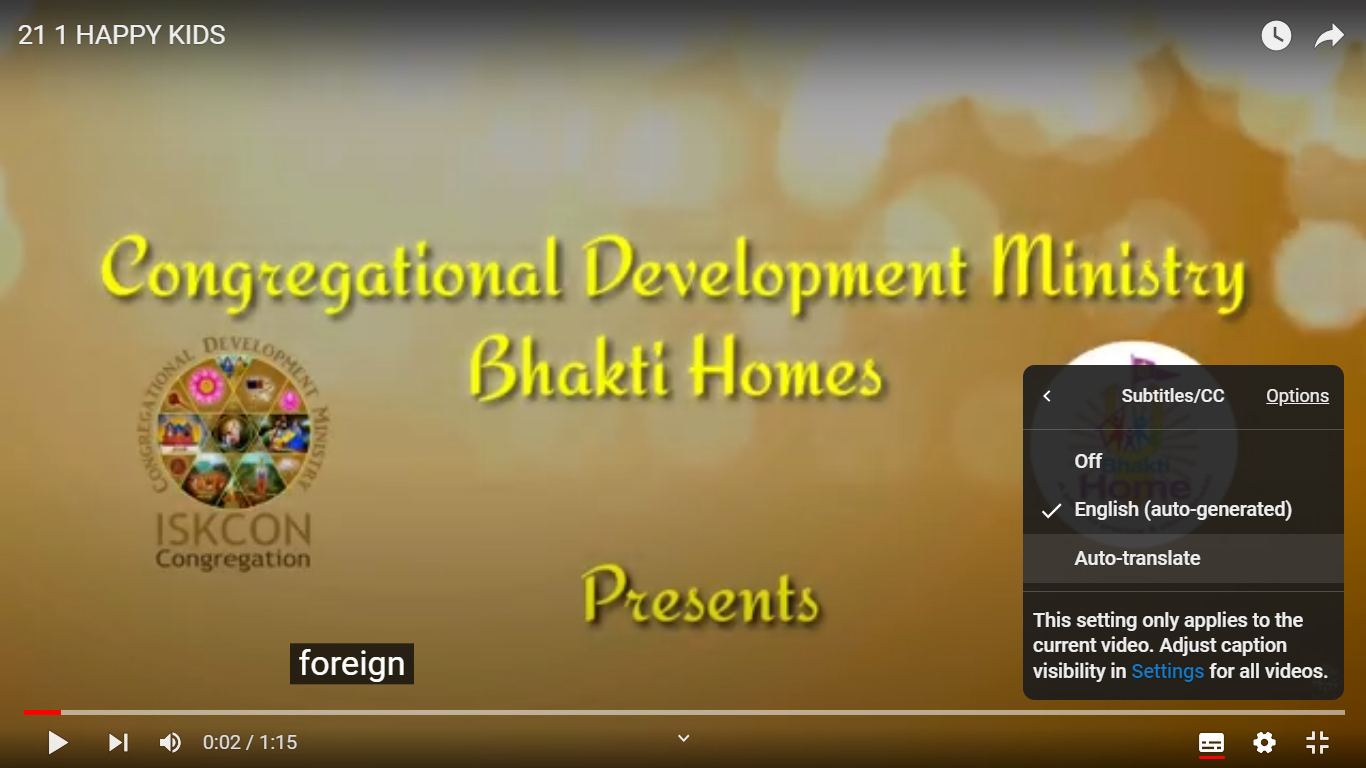
how to translate Youtube videos ON COMPUTER

Step 1

Press the “Settings Wheel” at the bottom right on the video.

Step 2

Select the “Captions (CC)” (or “Subtitles”) option

Step 3

If the option is available, choose “Auto- Translate” and go to Step 7. If not, select “English (Auto Generated)” and keep reading

Step 4

Press the “Settings Wheel” again at the bottom right of the video.

Step 5

Select the “Captions CC” option again

Step 6

Choose “Auto-Translate“

Step 7

Choose Your Language